 Anir Suren
A professional headshot used to mean booking a studio, paying a few hundred bucks, and waiting a week for the edits. You can now get one from a single selfie in about ten seconds, for free, inside ChatGPT.
I'm not going to tell you it "killed photographers." A great photographer still does things AI can't. But for a clean LinkedIn photo, a profile picture, or a speaker headshot, this is genuinely good enough now, and the price is zero. Here's the exact prompt I use, the one catch nobody mentions, and my full list of the most useful image prompts so you can do way more than headshots.
What it actually produces
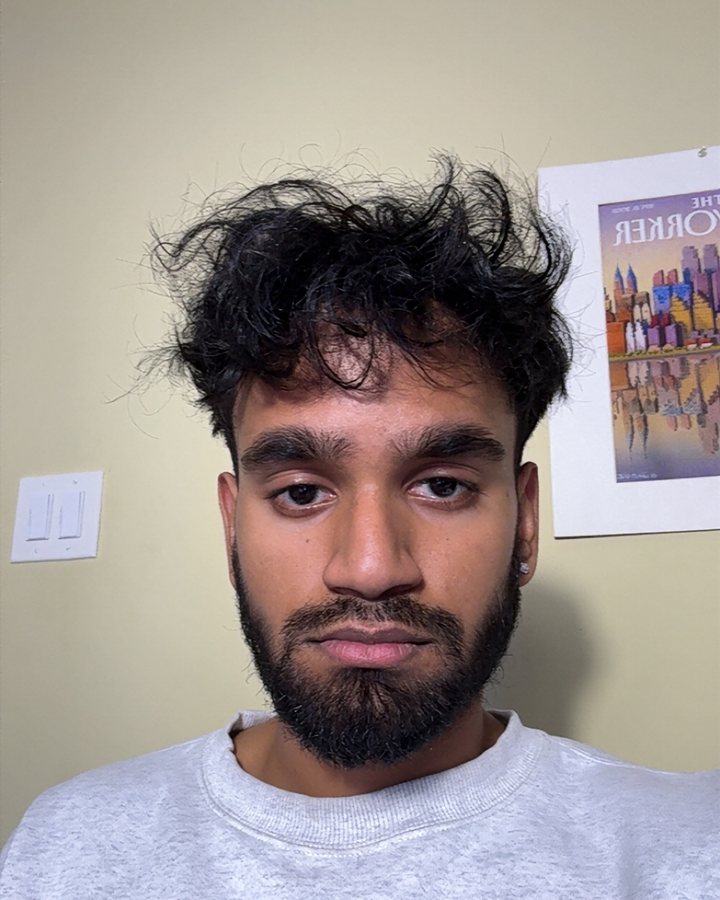
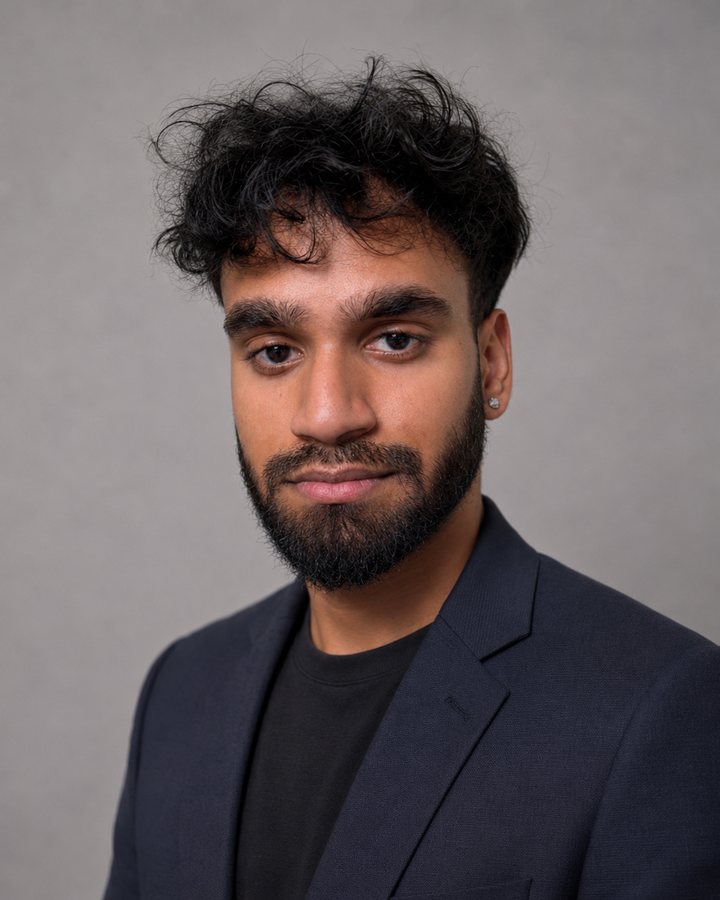
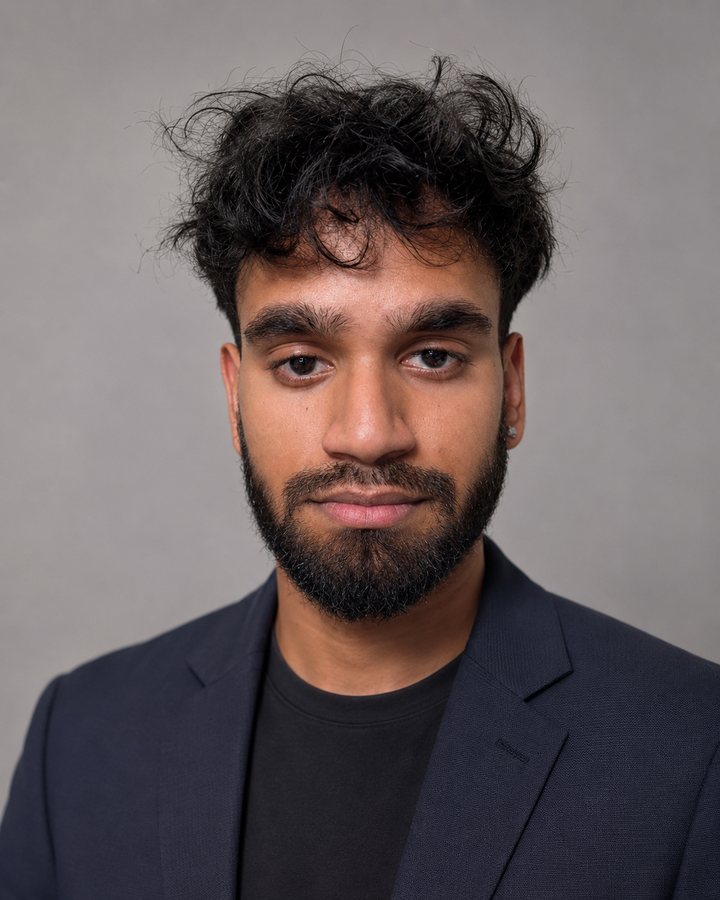
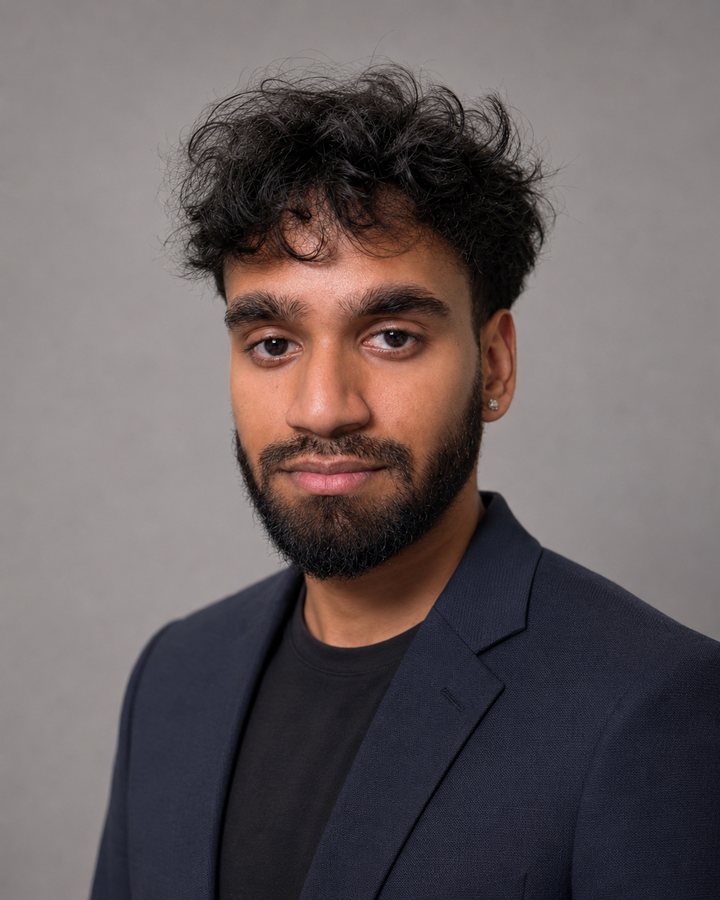
I'd rather show you than tell you. The first photo is the only thing I gave it, a normal selfie against my bedroom wall. The other three came back from that one image: same face, three angles, ready to use.
Why this works now
ChatGPT shipped a new image model, Images 2.0, on April 21, 2026. It jumped straight to the top of the public Image Arena leaderboard by the largest margin that test has ever recorded. The short version: the photos look real now. Skin texture, lighting, fabric, all of it holds up at a glance, which is exactly what you need for a headshot.
How to make your headshot in 30 seconds
You need ChatGPT (the free plan works, a paid plan gives you more generations and better speed).
- Start a new chat and turn on image mode. Click the image / create-image option so it knows you want a picture, not text.
- Upload a clear selfie. Good light on your face, eyes visible, no sunglasses, no heavy filter. The better the input, the more it looks like you.
- Turn on thinking mode, then paste the prompt below. Switching the model to its thinking/reasoning mode before you send makes it follow the details of the prompt much more closely.
- Generate, then edit. Don't settle for the first one. Ask it to change the background, the outfit, or the lighting in plain English and it redoes it in seconds.
The exact headshot prompt
This is the whole thing. Upload your selfie first, then paste this in:
Create a professional studio headshot of the person in the uploaded photo.
Keep my face, bone structure, skin tone, hairstyle, and any distinguishing
features exactly as they are in the selfie. Do not change my identity.

Frame me from the chest up, eyes to the camera, with a natural, confident
expression and a subtle smile. Use soft, even studio lighting with a gentle
key light from the front and a soft fill, no harsh shadows. Place me against
a clean, slightly out-of-focus neutral background in soft gray or muted blue.

Dress me in a well-fitted modern outfit appropriate for a business profile
(a tailored blazer over a plain shirt). Sharp focus on the eyes, realistic
skin texture with natural detail, shot on an 85mm lens at f/2.0, color
accurate and photorealistic. No over-smoothing, no plastic AI look.

Output in a vertical 4:5 portrait orientation.
Swap any part of it. Want an outdoor look, a black turtleneck, a darker background? Change those words. The structure is what matters: tell it to keep your identity, then describe the framing, lighting, background, and outfit.
The single most important line is "do not change my identity." Without it, the model quietly hands you a stranger who's dressed nicely.
Bonus: get three angles in one shot
This is the exact prompt that made the three photos at the top of this page. Instead of one headshot, it gives you a left angle, a straight-on, and a right angle, all matching wardrobe, lighting, and background, like one real photo session. Upload your selfie, turn on thinking mode, then paste:
Using the uploaded photo as the exact reference, generate THREE separate
professional LinkedIn headshot images of this same person. Same identity, same
wardrobe, same lighting, same background across all three. The only difference
is the head and body angle. Output all three images.

SAME PERSON IN ALL THREE: Preserve their identity precisely. Same facial
structure, eye shape and color, nose, lips, jawline, skin tone, skin texture,
hairline and hair style. Do not beautify, slim, or alter their features. All
three must look like the same person photographed in one session.

THE THREE ANGLES:
- Image 1, LEFT three-quarter: turned roughly 30 to 45 degrees to their left,
  shoulders matching, eyes turned back to the camera. Both eyes visible.
- Image 2, FRONT: facing the camera nearly straight on, slight shoulder turn,
  eyes to the camera.
- Image 3, RIGHT three-quarter: turned roughly 30 to 45 degrees to their right,
  shoulders matching, eyes back to the camera. Both eyes visible.

EXPRESSION (all three): relaxed and approachable, a subtle closed-mouth smile,
warm and confident. Soften any tension in the brow or jaw.

WARDROBE (identical): clean modern business professional, a well-fitted blazer
in a neutral tone (navy, charcoal, or black) over a simple top. No loud
patterns or logos.

BACKGROUND (identical): soft neutral studio backdrop, light-to-mid gray gentle
gradient, slightly out of focus. No props, no text.

LIGHTING (identical): soft flattering studio lighting, large softbox key at a
slight angle, soft fill, subtle hair and rim light for separation. Even skin,
no harsh shadows or blown highlights.

CAMERA: 85mm portrait lens at f/2.8, shallow depth of field, sharp focus on the
eyes. Head and shoulders, eye level, vertical 4:5 crop, small margin above the
head, frame ending mid-chest.

FINISH: high-resolution photorealistic. Natural retouching that keeps pores and
real skin texture, no over-smoothing or plastic look. Color accurate and
believable. Generate all three images.
The honest catch
Here's the thing most of these "AI killed photographers" videos skip. When you give the model just one selfie, it uses your face as a reference but partly rebuilds it from its own idea of what a face looks like. So the result can come out slightly off, a little too symmetrical, a little not-quite-you.
Three things fix most of that:
- Use a sharp, well-lit, front-facing selfie. Garbage in, stranger out.
- Tell it to match your exact features. Add a line like "match the exact eye shape, nose, and jawline from the photo" to the prompt.
- Generate a few and pick the closest, then edit that one. Say "keep this face but fix the background" instead of starting over.
If you want something that nails your likeness for a big professional moment, dedicated headshot tools that train on 10 to 20 of your photos still look more like you. But for free, in ten seconds, ChatGPT gets you 90% of the way there.
My full list of the most useful ChatGPT image prompts
The headshot is just the start. These are the image prompts I actually reuse. Upload the relevant photo first where it applies, then paste.
1. LinkedIn outdoor variation
Same person from the uploaded photo, professional headshot, but outdoors in
soft natural light with a blurred modern office or city background. Keep my
face and identity exactly. Warm, approachable expression. Vertical 4:5.
2. Circular profile / avatar
Turn the uploaded photo into a clean profile picture. Keep my face exactly.
Center my head, simple solid-color background, even lighting, friendly
expression. Crop square so it works as a circular avatar.
3. Swap the background to anything
Keep the person and pose from the uploaded photo exactly the same. Replace
only the background with [a bright modern office / a bookshelf / a soft
gradient]. Match the lighting on me to the new background so it looks real.
4. Change the outfit
Keep my face, pose, and the background from the uploaded photo. Change only
my clothing to [a charcoal suit / a smart casual sweater / a black blazer].
Make the fit and fabric look natural and realistic.
5. Black-and-white editorial portrait
Professional black-and-white editorial portrait of the person in the photo.
Keep my identity exactly. Dramatic soft side lighting, neutral background,
serious confident expression, fine film-grain texture. Vertical 4:5.
6. Speaker / conference shot
Place the person from the uploaded photo on stage giving a talk, holding a
mic, slightly blurred audience and stage lights behind. Keep my face and
identity exactly. Candid, mid-gesture, photojournalistic style. Landscape 3:2.
7. Clean up an existing photo
Take the uploaded photo and keep me exactly as I am. Remove the background
clutter, even out the lighting, gently sharpen, and fix color so it looks
like a polished professional shot. Do not alter my face or expression.
8. Restore an old or low-quality photo
Restore and upscale the uploaded photo. Keep the people and the scene exactly
the same. Remove scratches and blur, recover natural detail and color, and
make it look like a clean high-resolution version. No new elements added.
9. Personal-brand thumbnail
Use the person from the uploaded photo for a bold content thumbnail. Keep my
face exactly. Place me on the left, confident expression, with clean empty
space on the right for text. Punchy lighting, simple high-contrast background.
10. Email-signature mini portrait
Small, clean professional portrait of the person in the photo for an email
signature. Keep my face exactly. Tight crop from the shoulders up, plain
white background, soft even light, neutral friendly expression.
The bottom line
For free, from one selfie, you can get a headshot that's perfectly good for LinkedIn, your website, a podcast bio, or a slide. Use the prompt, keep your identity locked, generate a few, and edit the best one. Then keep the list above for everything else, because once you can describe a photo, you can make almost any image you need.
Try it on your current profile picture tonight and see if anyone notices it's AI. Most people won't.
– Anir
If this is the kind of AI thinking you want working on your own business, apply to work with me. And to catch the next breakdown, join the newsletter.