 Anir Suren
On November 10, 2026, OpenAI launched Businesses in ChatGPT. The short version: your business already shows up when people ask ChatGPT about you, and until now you had no say in what it said. Now you can claim your business, fix the details, add your products with real prices, and see what people were asking when ChatGPT pointed them your way.
Think Google Business Profile, but for AI. And it matters more than most owners realize, because OpenAI says 1.2 billion people use ChatGPT every week, and a growing slice of them are asking it where to buy things.
This is the whole guide. Where Business Hub lives, how verification works, exactly what to fill in, how to upload products, how to set up the Business Agent, what the insights show, and then the part most people will skip: how to write your profile so ChatGPT actually describes you the right way. The template and a prompt that drafts it for you are at the bottom.
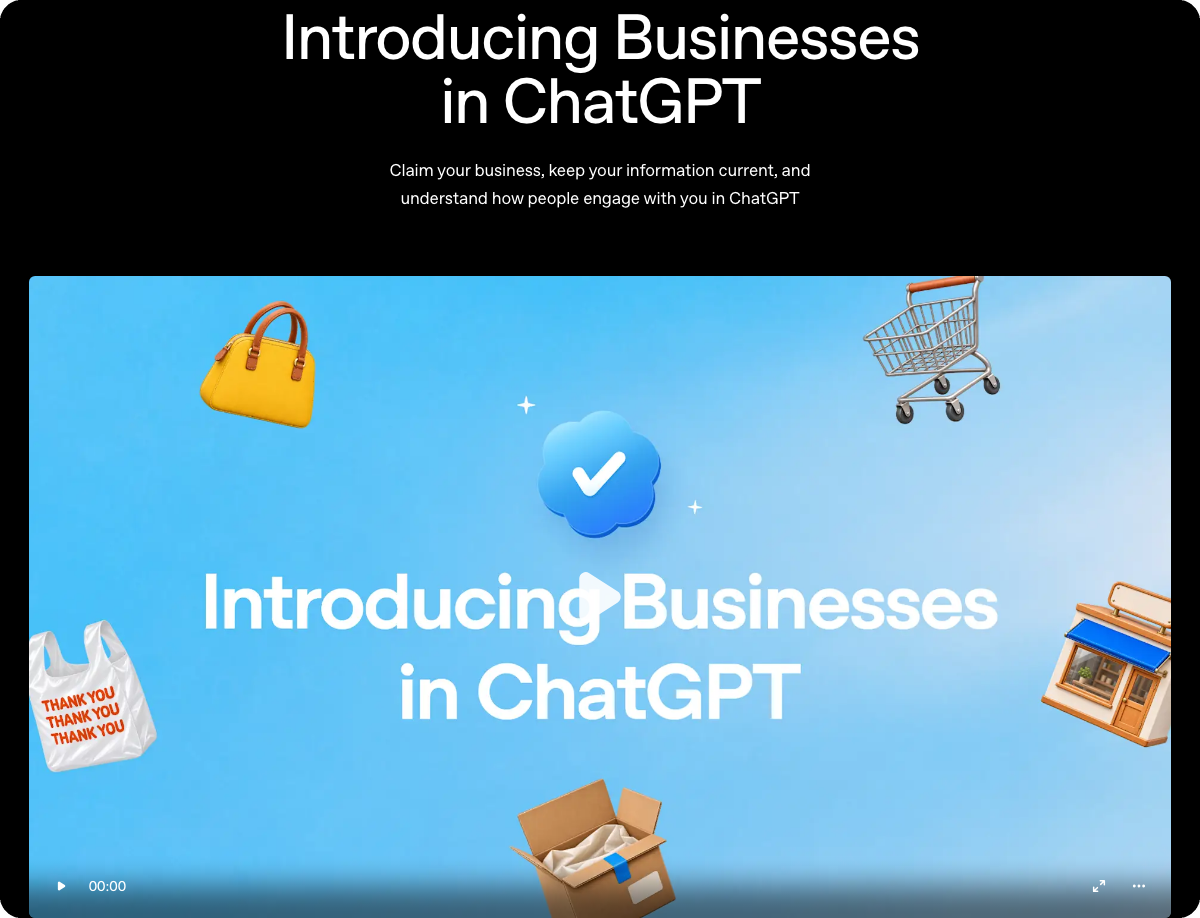
OpenAI's announcement, November 10, 2026. It's a beta, and it's live now.
Open Business Hub in ChatGPT →
Before you start: who can claim, and what it costs
Everything here comes from OpenAI's announcement, their help center guide, and their Businesses in ChatGPT policy. Where they're vague, I'll say so.
- Cost: there's no fee anywhere on OpenAI's pages for claiming or managing your business. The help center spells out that you don't need an Ads account or a ChatGPT Enterprise agreement. Ads are a separate paid product and you never have to touch them.
- Who can claim: any eligible business in a country where ChatGPT is available, as long as you own it or are authorized to represent it. OpenAI says claiming is "initially available to eligible businesses with a website," and that eligibility depends on your industry, your location, and their verification and integrity checks.
- Local shops and restaurants: the help center says these can currently only claim an existing listing, and only in the US. If you're a local business outside the US and you don't see yourself in Business Hub yet, that's why. OpenAI says more markets and categories are coming.
- The Business Agent (the AI salesperson part) is only open to eligible ecommerce and online service businesses in the US right now.
- Enterprise customers and existing advertisers claim through their OpenAI rep instead of the self-serve flow.
You'll need a ChatGPT account (OpenAI doesn't say a paid plan is required; the help center only rules out needing an Ads account or an Enterprise agreement), access to your business phone, business email, or your domain's DNS settings, and a government ID for the identity check later. If you sell on Shopify, have your store login handy because it's the fastest route.
Step 1. Open Business Hub and find your business
Business Hub lives inside ChatGPT. Sign in at chatgpt.com and look for Business Hub in the left sidebar, or go straight to chatgpt.com/business-hub.
- Search for your business by name. Results show the name with the street address under it, so check you're picking the right location and not a competitor with a similar name.
- Select the matching listing. ChatGPT shows you which account will manage the profile. Confirm it's the account you want running this long term, because that account becomes the admin.
- Pick a verification method (next step).
If your business isn't listed and you're eligible, Business Hub offers to add it. At launch that flow asks how customers reach you (a physical location, an online store, or a service), then asks for your website, a category, and a short description. If a listing shows Contact support, it's locked and you'll need to go through OpenAI support. If someone has already claimed your business, open the profile, hit the ••• menu, and choose Dispute ownership.
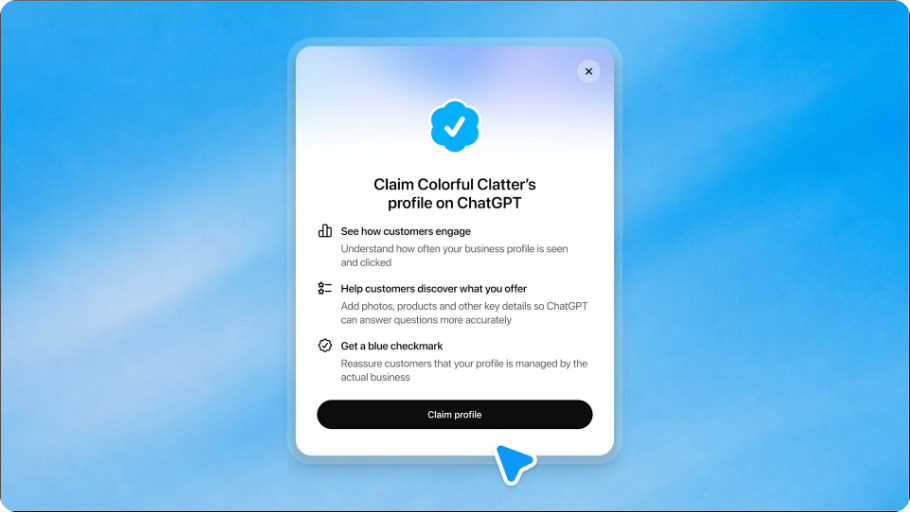
The claim card. Three things you get: engagement data, control over your details, and the blue check.
Step 2. Verify you actually own it
OpenAI gives four ways to prove the business is yours. Which ones you see depends on the listing, so don't panic if you only get two or three.
- Business phone. Select Business phone, choose a text message or an automated call, hit Get code, enter the code. The number has to be the one already tied to the listing.
- Business email. Select Business email, hit Get code, enter the code that lands in the inbox associated with the business.
- Website domain (DNS). ChatGPT shows you a TXT record with a type, a name or host, and a value. Add it in your DNS settings (GoDaddy, Cloudflare, Namecheap, wherever your domain lives), copying each field exactly. DNS can take a while to update. Then come back and hit Verify domain. If someone else manages your domain, send them the record. This is the method to use when the phone or email on the listing is old.
- Shopify store. Either open the ChatGPT app inside your Shopify admin and follow the prompts, or from Business Hub select Shopify store, then Connect Shopify, and sign in.
After you verify, OpenAI reviews the claim and emails you a decision (or a request for more info). While it's under review you'll see Cancel claim if you need to back out. People who've been through it describe a simple tracker: claim received, review in progress, decision reached.
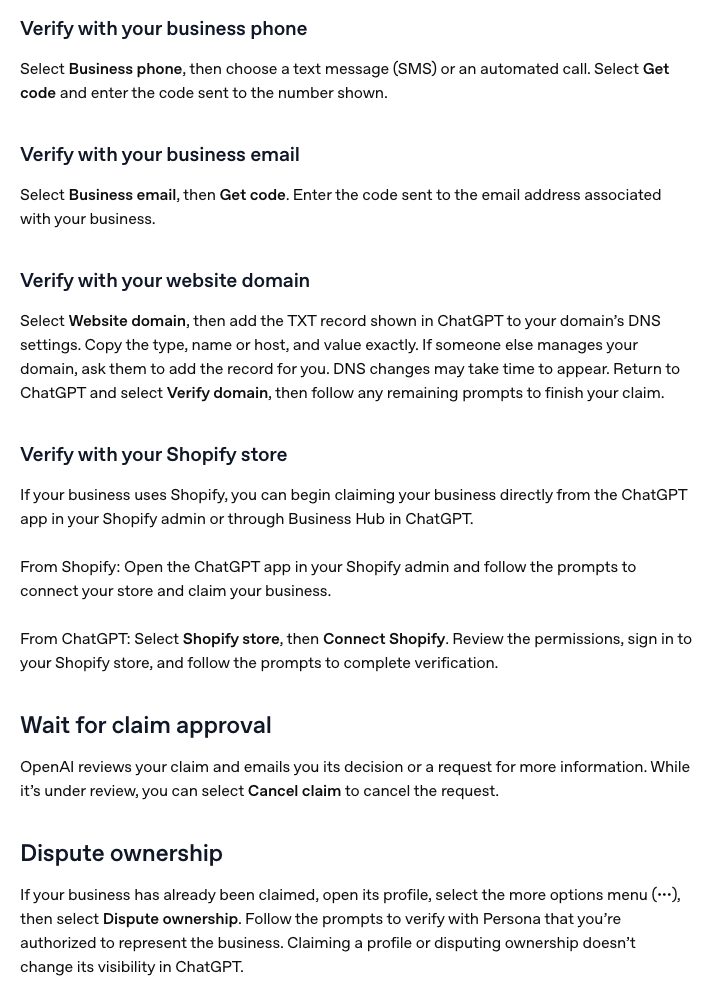
The four verification routes, straight from OpenAI's help center.
Step 3. Verify your identity with Persona (this is what gets you the blue check)
Here's the part the launch video glosses over. Claim approval proves you're connected to the business. It does not let you publish anything yet. For that, OpenAI runs an identity check through Persona, and you need it approved before you can:
- publish changes to your profile,
- see your insights,
- connect a product feed, or
- set up a Business Agent.
In Business Hub, select Verify with Persona, then Continue to Persona. You can also do it later from the profile overview (Complete verification with Persona). Expect to be asked for a government-issued ID, business registration details, and proof you're authorized to act for the business. One detail that trips people up: use your legal business name exactly as it appears on your registration documents, and put your trade name or "doing business as" name in its own field if there is one. Names and numbers have to match the official records.
Once Persona approves you, a new profile publishes automatically and the blue verified check shows up on it. If the check fails or expires, you'll see Try again and can resubmit with corrected info.
Step 4. Fill in your profile
Now the useful part. After approval you can edit your business information in Business Hub. OpenAI's help center lists these fields:
- Website
- Business description
- Product or service category
- Logo
- Cover photo
- Delivery policy
- Return policy
- plus "other optional details"
Depending on your listing type you may also see contact details, hours, and an address or service area. OpenAI's policy says all of it has to be truthful and kept current: name, category, address or service area, hours, contact details, and products or services. No made-up prices, no "best in the city" claims you can't back up.
Two things to know. OpenAI reviews your changes before they go live, so edits can take time to appear. And a saved change doesn't mean every ChatGPT answer updates instantly. Be patient and don't resubmit the same edit five times.
Below is what a finished profile looks like inside a ChatGPT answer. Notice the About text, the delivery and returns lines, and the product cards with prices. That's what you're writing toward, and the template further down gives you every line.
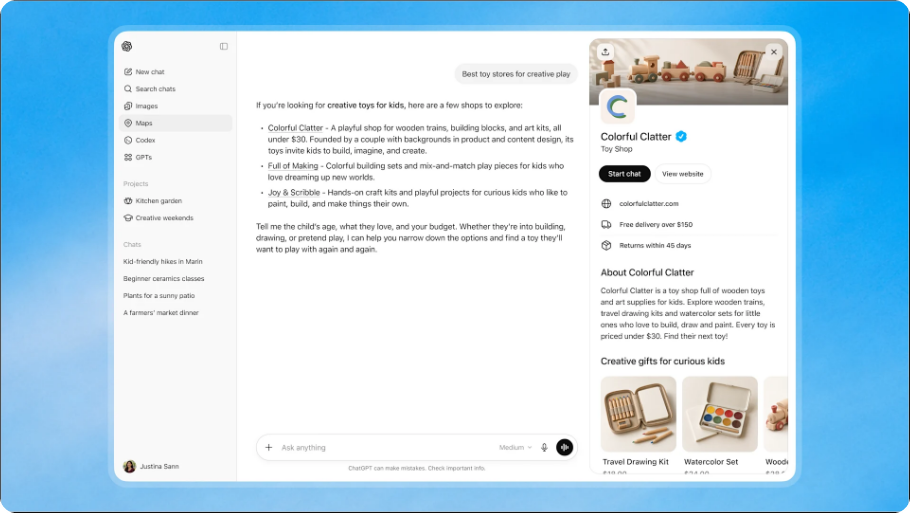
What customers see: the claimed profile card next to ChatGPT's answer, with your About text and products.
Step 5. Upload your products (so ChatGPT quotes real prices)
If you sell physical or digital products, this is the step that stops ChatGPT guessing. In Business Hub you connect a product feed, and ChatGPT may use it to answer customer questions with current pricing and availability. You have three options:
- Shopify: connect your store and your existing catalog syncs. No separate file needed. (OpenAI notes Shopify products can already appear in ChatGPT through Shopify's catalog even without the app, but connecting is what ties them to your claimed profile and agent.)
- Hosted feed URL: enter a link that points directly to your feed file.
- File upload: upload a CSV that follows OpenAI's product feed spec. Use this if Business Hub can't import your hosted file. The spec also accepts TSV and JSONL.
The spec has dozens of optional columns, but these are the ones every row must have: item_id, title, description, url, brand, seller_name, image_url, availability, price, target_countries, and store_country. A few formatting rules that reject rows if you get them wrong:
- Price is the amount, a space, then the currency code:
24.00 USD. No dollar signs, no commas. - Availability must be one of
in_stock,out_of_stock,pre_order,backorder, orunknown. Blank or misspelled gets the row thrown out. - Titles should stay under 150 characters and descriptions under 5,000, in plain text.
- Image URLs have to be public, direct links to the image file (JPEG or PNG), ideally HTTPS.
- Your product URLs need to be on the same domain as the website on your profile. That mismatch is the first thing OpenAI's troubleshooting list tells you to check.
Optional columns worth filling if you have them: sale_price, shipping_price, product_category, color, size, material, return_policy, star_rating, and review_count. The more specific your feed, the better the agent answers "do you have this in blue under $50."
One honest note from OpenAI: connecting a feed does not publish an agent and does not guarantee ChatGPT will recommend your products. It gives ChatGPT accurate information to work with. That's the point.
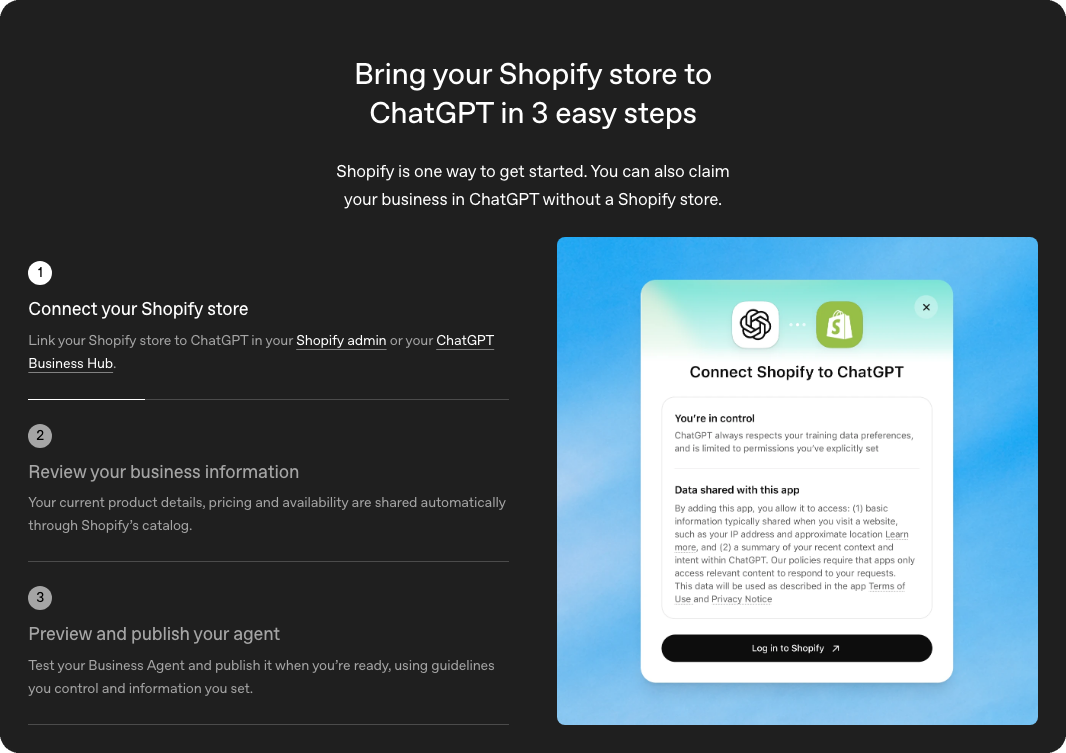
The Shopify route in three steps. OpenAI's own page notes you can claim without a Shopify store too.
Step 6. Set up your Business Agent (US online sellers)
This is the piece from the video: a salesperson that never clocks out. A customer asks for a gift for a six-year-old who loves drawing under $30, and your agent answers with two of your products and the prices, inside a chat that's clearly labeled as yours and kept separate from ChatGPT's own answers.
Who can build one: an eligible US ecommerce or online service business with a website, an approved claim, Persona verification done, and compliance with OpenAI's Business Agents Policy. OpenAI is clear that verification alone doesn't make you eligible; they review the category and the intended use before the agent can go live, and they don't publish a list of approved categories.
How to set it up:
- In Business Hub, open your business under the Business tab. If you connected Shopify, there may already be a draft agent waiting. Otherwise, create one if the option shows.
- Review what the agent knows: your product details, delivery policy, return policy, and the rest of your profile. This is why Steps 4 and 5 come first. The agent only knows what you gave it.
- Write its instructions. Keep them inside the policy: the agent has to say it's an AI representing your business, it can't invent prices, stock, reviews, or guarantees, no fake urgency, no asking for sensitive personal data, and no advice that legally needs a licensed professional.
- Preview it. Ask it the ten questions your customers actually ask (shipping times, returns, sizing, "what's good for..."). Fix the answers you don't like by fixing the underlying info.
- Hit Publish. Only published agents can be chatted with. OpenAI reviews it when you create it and again every time you update it, and can pause or remove it.
What it can't do yet: complete a purchase, make a booking, or look up an order. It explains your products and policies and sends people to your website to buy. OpenAI also says they don't share people's conversations or Business Agent chats with you, so you won't get transcripts.
If you don't qualify for the agent yet, you still get everything else. OpenAI's own FAQ says ChatGPT may show your business information whether or not you have an agent. The agent is a bonus on top of a correct profile, not the other way around.
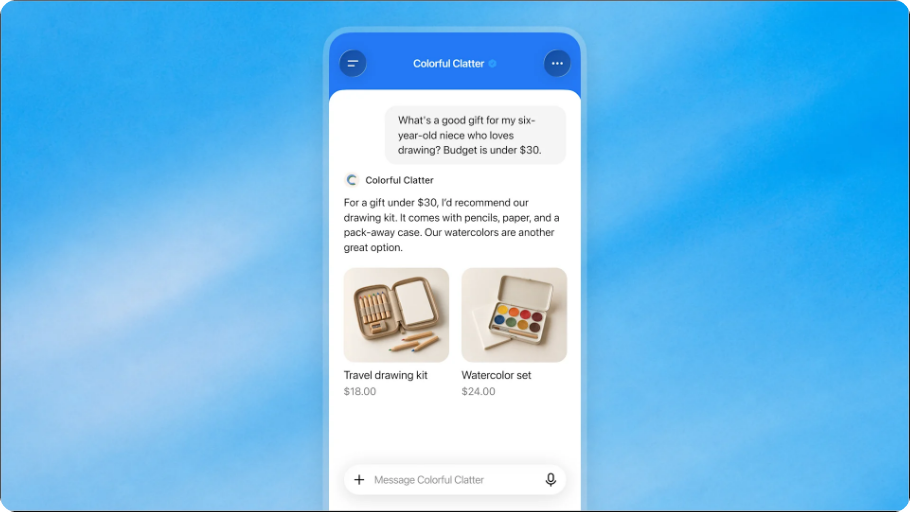
OpenAI's demo: the agent answers with two real products and real prices.
Step 7. Read your Business Hub insights
Once Persona has approved you, the Business Hub dashboard shows how people run into you in ChatGPT. It's aggregated, it covers the past 28 days (with a 7-day toggle), and it only appears once there's enough activity to clear OpenAI's reporting threshold, which they don't publish. Here's what each number means, in OpenAI's words paraphrased:
- Mentions. For an online business, a mention counts when ChatGPT references your website. Your brand name alone being said doesn't count. For a local business, it counts when ChatGPT shows a result for your location, even if nobody opened it.
- Profile views. Shown on the dashboard in OpenAI's demo alongside the other two.
- Website clicks. How often someone clicked through to your site from ChatGPT.
- Discovery topics. The common themes in the conversations where you were cited, grouped together, with the share of each. In the demo toy shop: "Affordable kids activities," "Gift for kids," "San Francisco toy shops." This is the one I'd check every week, because it tells you what people wanted right before ChatGPT sent them to you. That's ad copy, blog titles, and product bundles handed to you.
Two caveats. A blank metric doesn't mean zero; it usually means you haven't crossed the threshold yet or the data is still collecting. And discovery topics don't show individual prompts, so you won't see exactly what one person typed. People who've tested this report that links from ChatGPT carry utm_source=chatgpt.com, so you can watch the same traffic land in your own analytics.
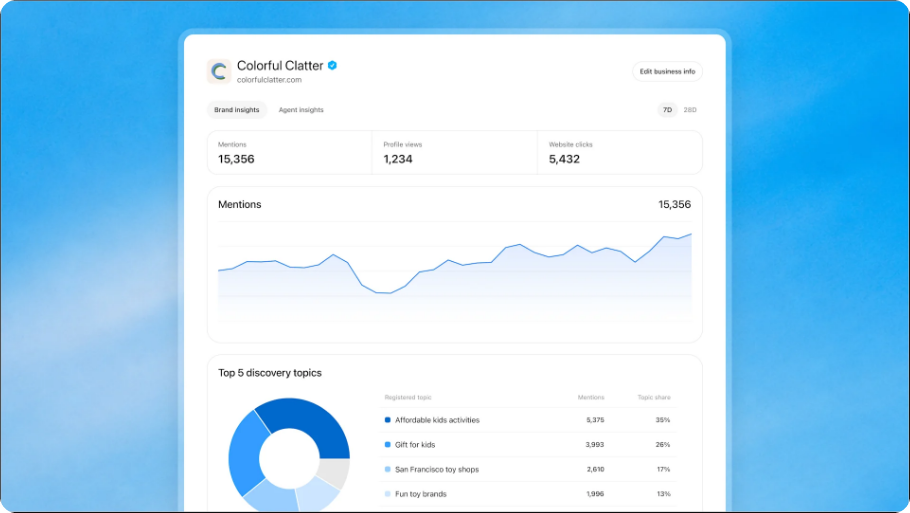
The Business Hub dashboard from OpenAI's demo: mentions, profile views, website clicks, and discovery topics.
Do not pay anyone to claim this for you. Expect the "we'll get you verified on ChatGPT" emails and DMs to start landing. Claiming is self-serve and OpenAI lists no fee. Nothing you pay a third party changes how often ChatGPT recommends you; OpenAI says claiming doesn't guarantee higher placement, and even their own ads "don't influence ChatGPT's independent answers." An agency also shouldn't claim on your behalf, because whoever claims it becomes the admin of your business. Claim it yourself with your own account, then add your team or your agency as teammates from inside Business Hub, each with their own ChatGPT login. Never forward your claim invitation to anyone else.
How to write your profile to get ahead
Here's the thing most owners will get wrong. They'll paste their Instagram bio into the description field and call it done. But ChatGPT isn't a customer skimming a bio. It's a model trying to answer a specific question, like "is there a toy shop near me that does gifts under $30 and ships today?" If your profile doesn't contain the words "gifts," "under $30," your city, and "same-day shipping," it can't say yes.
So write your profile the way you'd brief a brand-new salesperson on their first day. Rules I'd follow:
- Lead with what you sell and who it's for, in plain nouns. "Wooden toys, art kits, and building sets for kids 2 to 10" beats "curated play experiences."
- Put the facts people ask about in writing: price range, city or service area, delivery times, return window, hours, how to contact you. If it's not in the profile, ChatGPT has to guess, and OpenAI's policy says the agent can't invent it.
- Say what makes you different in one sentence, with proof. "Family-run since 2014, every toy tested by our own kids" is checkable. "Premium quality and unmatched service" is noise.
- Name your top products or services with prices. Even if you also upload a feed, the About text is what shows on the card.
- Say what you don't do. "We don't offer repairs" saves you a dozen wrong referrals.
- Match your website. OpenAI's own troubleshooting steps say your product URLs have to sit on your profile's domain, and inconsistent names or prices between your site and your profile are exactly the kind of thing their review flags.
- No superlatives you can't prove, no competitor names, no keyword stuffing. OpenAI reviews the profile before it publishes, and the policy bans misleading claims.
Here's the fill-in template. Copy it, replace every bracket, delete any line that doesn't apply, and paste each section into the matching field in Business Hub.
BUSINESS DESCRIPTION (short, 2 to 3 sentences, the first thing ChatGPT reads)
[Business name] is a [what you are: toy shop / plumbing company / online skincare brand] in [city, state, or "online, shipping to the US"]. We sell [your 3 to 5 main product or service types, plain words] for [who it's for]. Most [products/services] cost [price range], and we [key promise with proof: ship same day on orders before 2pm / have been family-run since 2014 / are licensed and insured in Texas].

ABOUT (the longer text that shows on your profile card)
What we sell: [list your main categories with one example and a price each, like "art kits ($12 to $30), wooden trains ($18 to $45), building sets ($20 to $60)"].
Who it's best for: [your ideal customer in one line: parents buying gifts for kids 2 to 10 / small restaurants that need weekly deep cleaning].
What makes us different: [one sentence with something checkable: years in business, a specialty, a guarantee you actually honor, a certification].
Where and how to buy: [in store at (address) / online at (website) / book at (link or phone)].
Hours: [Mon to Fri 9 to 6, Sat 10 to 4, closed Sun].
Service area: [the cities, neighborhoods, or zip codes you actually cover, or "we ship to the US and Canada"].
Delivery: [how fast, what it costs, free threshold if any].
Returns: [window, condition, who pays return shipping].
Contact: [phone], [email], [best way to reach you fast].
We don't: [the 1 to 3 things people wrongly ask you for].

PRODUCT OR SERVICE DETAILS (repeat this block for your top 5 to 10)
Name: [exact name as it appears on your website]
Price: [24.00 USD] (sale price if any: [19.00 USD until (date)])
What it is: [one plain sentence: what it does, what's included, size or scope]
Best for: [the person or problem it fits, like "a gift for a 5 to 8 year old who loves drawing"]
Key details: [materials, dimensions, durations, what's included, compatibility, any age or safety note]
Availability: [in stock / made to order, ships in 5 days / book 2 weeks ahead]
Link: [the exact product or booking page URL on your own domain]

POLICIES (paste into the delivery and return policy fields)
Delivery policy: [carrier, processing time, delivery estimate, cost, free shipping threshold, areas you don't ship to].
Return policy: [return window in days, condition required, refund method, who pays return shipping, items that can't be returned].

CUSTOMER QUESTIONS (for your Business Agent instructions, if eligible)
Introduce yourself as an AI assistant for [business name]. Only answer using the business information and products provided. If you're not sure, say so and point the customer to [phone or email]. Never make up prices, stock, delivery dates, reviews, or guarantees. Don't pressure anyone to buy. Don't ask for payment details, ID numbers, or health information. For purchases, bookings, and order status, send the customer to [website URL].
The questions we get most, with the answers:
Q: [Do you ship to Canada?] A: [Yes, 7 to 10 days, $15 flat.]
Q: [What's a good gift for a 6 year old under $30?] A: [Travel drawing kit ($18) or the watercolor set ($24).]
Q: [Can I return an opened item?] A: [Yes within 30 days if it's undamaged, you cover return shipping.]
Q: [Do you do repairs?] A: [No, but (name) in (town) does.]
Q: [...]
A few notes on using it. The Business description is the one you should sweat, because it's the compressed version ChatGPT leans on. The About block is where the facts go. The product blocks are worth doing even if you upload a feed, because the feed holds the data and the About text holds the context. And the customer questions section is pure gold for the agent: every answer you write there is an answer the agent won't have to improvise.
The prompt that drafts it from your website
You don't have to write this from scratch. Paste the prompt below into ChatGPT or Claude, swap in your website, and it'll pull the facts off your site and fill in the template above. Where it can't find something, it marks it for you to fill in instead of inventing it, which is the whole point.
You're helping me write my business profile for Businesses in ChatGPT (OpenAI's Business Hub). The profile needs to let an AI answer customer questions about my business accurately, so facts matter more than marketing language.

My website: [paste your website URL]
Extra facts not on the site: [hours, service area, phone, delivery and return terms, anything else, or write "none"]

Read my website (home page, about page, product or service pages, shipping and returns pages, contact page). Then write my profile using exactly this structure:

1. BUSINESS DESCRIPTION: 2 to 3 sentences. What we are, where we are or where we ship, the 3 to 5 main things we sell, who it's for, the typical price range, and one checkable thing that makes us different.
2. ABOUT: short labeled lines for What we sell (categories with an example and price each), Who it's best for, What makes us different, Where and how to buy, Hours, Service area, Delivery, Returns, Contact, and We don't (things people wrongly ask us for).
3. PRODUCT OR SERVICE DETAILS: for our top 8 products or services, give Name (exactly as on the site), Price in the format "24.00 USD", What it is (one sentence), Best for, Key details, Availability, and the exact URL on our domain.
4. DELIVERY POLICY and RETURN POLICY: each as one short paragraph in plain language.
5. CUSTOMER QUESTIONS: the 10 questions a customer is most likely to ask us, each with a one-line factual answer drawn from the site.

Rules:
- Use only facts you can find on my website or in the extra facts above. Do not invent prices, dates, guarantees, reviews, awards, or numbers.
- Anywhere you can't find a fact, write [CHECK: what's missing] so I can fill it in. Never guess.
- Plain English a 12 year old would understand. No superlatives ("best," "premium," "unmatched"), no competitor names, no keyword stuffing, no exclamation marks.
- Keep every product title under 150 characters and every description under 5,000 characters.
- Where my site contradicts itself (two different prices, old hours), flag it with [CONFLICT: ...] instead of picking one.

After the profile, add a short list titled "Things to fix on your website first" with anything you found that's missing, outdated, or inconsistent, because OpenAI reviews the profile against the site.
Read what comes back before you paste it in. The model is good at pulling facts; it's not responsible for them, you are. Fill every [CHECK], resolve every [CONFLICT], then paste each section into Business Hub.
For fifteen years the game was getting Google to describe your business correctly. The same game just started again inside ChatGPT, and right now almost nobody has claimed their spot.
Your checklist for this week
- Open chatgpt.com/business-hub and search your business. Claim it (or add it, if offered).
- Verify by phone, email, DNS, or Shopify. Wait for the approval email.
- Finish the Persona identity check with your legal business name.
- Run the prompt above on your website, fix the [CHECK]s, and fill in every profile field.
- Sell products? Connect Shopify or upload a feed with correct prices and availability.
- US online seller? Build, test, and publish your Business Agent.
- Put a weekly reminder in your calendar to read your discovery topics. Turn the top one into your next post, email, or ad.
And if anyone emails you offering to "get you verified on ChatGPT" for a fee, you now know exactly how to do it yourself in an afternoon.
Claim it this week, before the shop down the street does. Then go read your discovery topics, because that's where your next customer already told you what they want.
– Anir
If this is the kind of AI thinking you want working on your own business, apply to work with me. And to catch the next breakdown, join the newsletter.