 Anir Suren
UGC ads used to mean finding a creator, shipping them your product, waiting two weeks, and paying a few hundred dollars per video. You can now make one from a single product photo in about a minute, and the person in it doesn't exist.
Google shipped a new video model called Gemini Omni, and it's good enough that most people scrolling won't clock it as AI. You give it a picture of your product and a prompt, and it generates a realistic person holding it, talking to camera, with the voice already synced to their lips. Here's the exact prompt I use and the full setup, start to finish.
What it actually produces
Here's a real one. The image on the left is the only product photo I gave it, a plain serum bottle. The two videos are what Gemini Omni made from it. The people, the voices, and the lip sync were all generated from that single picture. Tap a video to hear the synced audio, that's the part that used to take three separate tools.
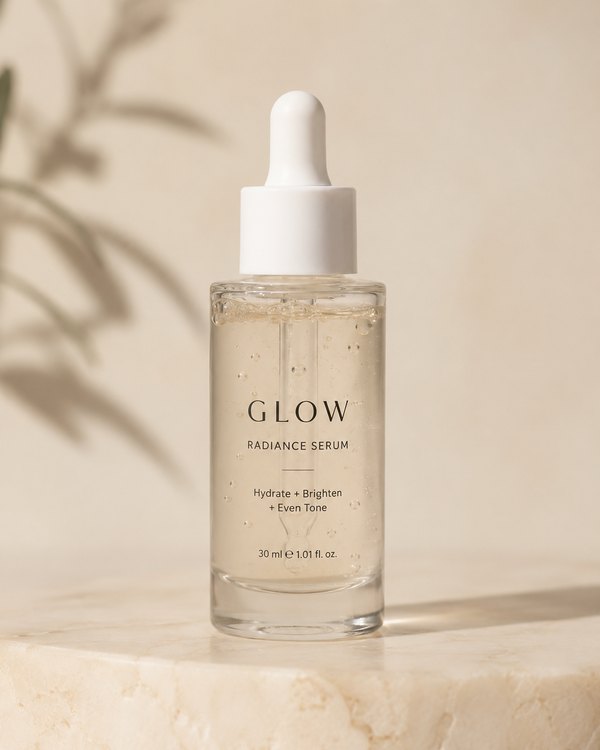
What Gemini Omni actually is
Gemini Omni is the video model Google announced at its I/O event in May 2026. The big deal is that it's multimodal: it takes an image, text, and audio all at once and outputs a short clip, around ten seconds, with synchronized sound baked in. In the Gemini app it's now the default video generator, replacing the older Veo models.
That synced audio is the whole reason this works for UGC. Older tools made a silent clip, then you had to run it through a separate lip-sync step to make the person talk. Omni does the talking, the lip movement, and the room sound in one shot. That's the "sync" part people struggle with, handled for you.
The old UGC stack was a model for the video, a second tool for the voice, and a third to sync them. Omni does all three in one generation.
How to make your UGC video
- Open Gemini. Search "Google Gemini," click the first link, and sign in.
- Start a video. Click the plus button near the text box, and in the drop-down pick Create video.
- Add your product photo. Upload a clean image of your product into the box. This is what the model builds the scene around, so use a clear, well-lit shot.
- Paste the prompt below and edit the bracketed parts for your product and your customer.
- Set it up and send. Choose your aspect ratio (9:16 for Reels, TikTok, and Shorts), turn on thinking mode so it follows the prompt more closely, then hit send.
About ten seconds of video takes a minute or two to generate. Make a few and keep the best one.
The exact UGC prompt
Upload your product image first, then paste this. Swap everything in brackets for your product and your audience.
Using the attached product image, create a realistic 10-second UGC-style
video ad. The product must look exactly like the photo, same packaging,
colors, and label.

A [woman in her late 20s] is holding the product in a [bright, lived-in
kitchen], filming herself on a front-facing phone camera. Slightly shaky
handheld selfie style, natural daylight, casual and authentic, not polished
or cinematic.

She looks into the camera with genuine excitement and says, in a warm
conversational tone: "[Okay I have to show you this. I've been using it
every day for a month and I'm kind of obsessed, it actually works.]"

Halfway through she turns the product to show the label, then smiles.

Realistic skin texture, natural lighting, real ambient room sound, and
lip-synced audio that matches her speech exactly. Vertical 9:16. Authentic
phone-camera UGC look. No studio lighting, no on-screen text, no music.
The line in quotes is the script she actually says, so write it the way a real customer would talk. Short, specific, a little casual. That one line does more for believability than anything else in the prompt.
Make it look less like an ad
- Write a real sentence, not ad copy. "This fixed my dry skin in a week" beats "Introducing our revolutionary formula."
- Pick a normal setting. A kitchen, a car, a bathroom counter. Studios read as fake.
- Keep it to one clip per idea. Omni clips run about ten seconds. For a longer ad, generate two or three and stitch them.
- Generate a few and choose. Hands and fast motion are still where AI video slips, so pick the take where they look clean.
The honest catch
Two things the hype videos skip. First, making video inside the Gemini app needs a paid Google AI plan, so it isn't free the way a normal chat is. There's a free route through YouTube's Shorts Remix and Create tools for eligible users, but the in-app version is paid.
Second, Google stamps every AI video with an invisible watermark called SynthID, and platforms are getting better at detecting AI content. So this is great for making ads fast, but be honest in your labeling where the platform or the law asks for it. The goal is to save the shoot, not to trick anyone.
Even with those caveats, this is the closest thing to a free UGC creator I've seen. One photo, one prompt, and you've replaced a whole shoot.
Try it on a product you actually use tonight, and write the script the way you'd text a friend about it. That's the version that converts.
– Anir
If this is the kind of AI thinking you want working on your own business, apply to work with me. And to catch the next breakdown, join the newsletter.